
✅ HOW TO: Harness the details tab
Under this tab, there are more details about the reservation and you can edit them. All of these fields are optional. Remember the power of information and Planniac's mantra: "If you know it, show it!"
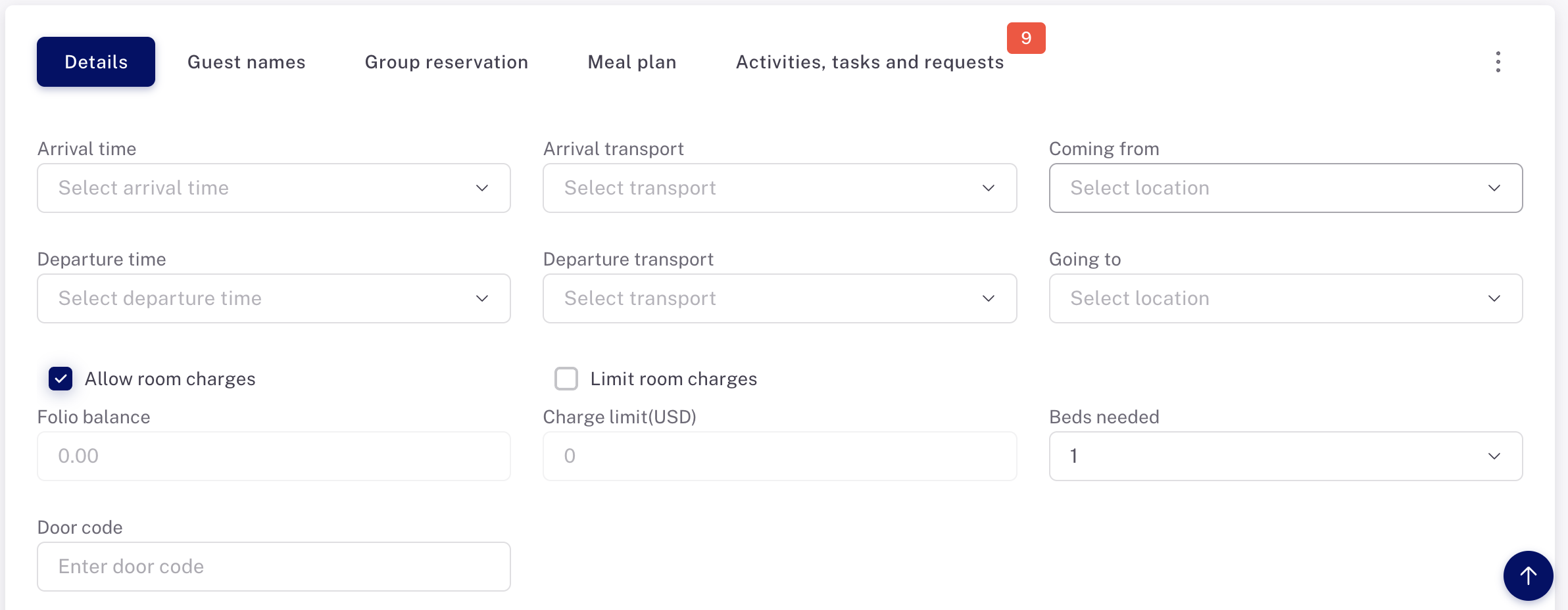
Arrival time
If an arrival time was set on the PMS, it will display here. But you can also add in an arrival time if you know it. However, be aware that this is not the same thing as creating a plann for an arrival transfer.
Arrival transport
This is a drop-down list of commonly used transport methods such as 'Taxi' or 'Private car' (those are controlled in Settings > Locations & Transport). Again, these are not the same as planns made for arrival transfers. You can type something in if it doesn't appear on the list.
Coming from
It can be helpful to know where your guest is coming from, such as the train station or another hotel. Select from the list of write it in
Departure time
Add in a departure time if you know it. However, be aware that this is not the same thing as creating a plann for a departure transfer.
Departure transport
This is a drop-down list of commonly used transport methods such as 'Taxi' or 'Private car' (those are controlled in Settings > Locations & Transport). These are not the same as planns made for departure transfers. You can type something in if it doesn't appear on the list.
Going to
If you know where your guest is headed after leaving your hotel, you may enter it here.
Beds needed
This is useful to indicate when an extra bed, rollaway or futon is needed. The selection here will appear on the housekeeping report.
Allow room charges
This is ticked 'on' by default. If you turn this 'off' for a guest, the 'Room charge' option will not show on the payment methods when recording a payment for an activity.
Limit room charges
You can type in a credit limit. If that limit is exceeded, the user will no longer be able to charge an activity to a room.
Door code
This is a simple, manual method of assigning a door code for a guest. Type it in, and the code will appear on the guest itinerary. At this time Planniac does not integrate with key card software.