
Guests love itineraries!
Use Planniac to keep guest plans in front of them all the time.
These days, so many people use their mobile devices on holidays. Planniac gives you an itinerary tool that you can send to guests so they can stay informed before and during their trip.
This easy-to-follow itinerary is formatted for mobile and will really help!
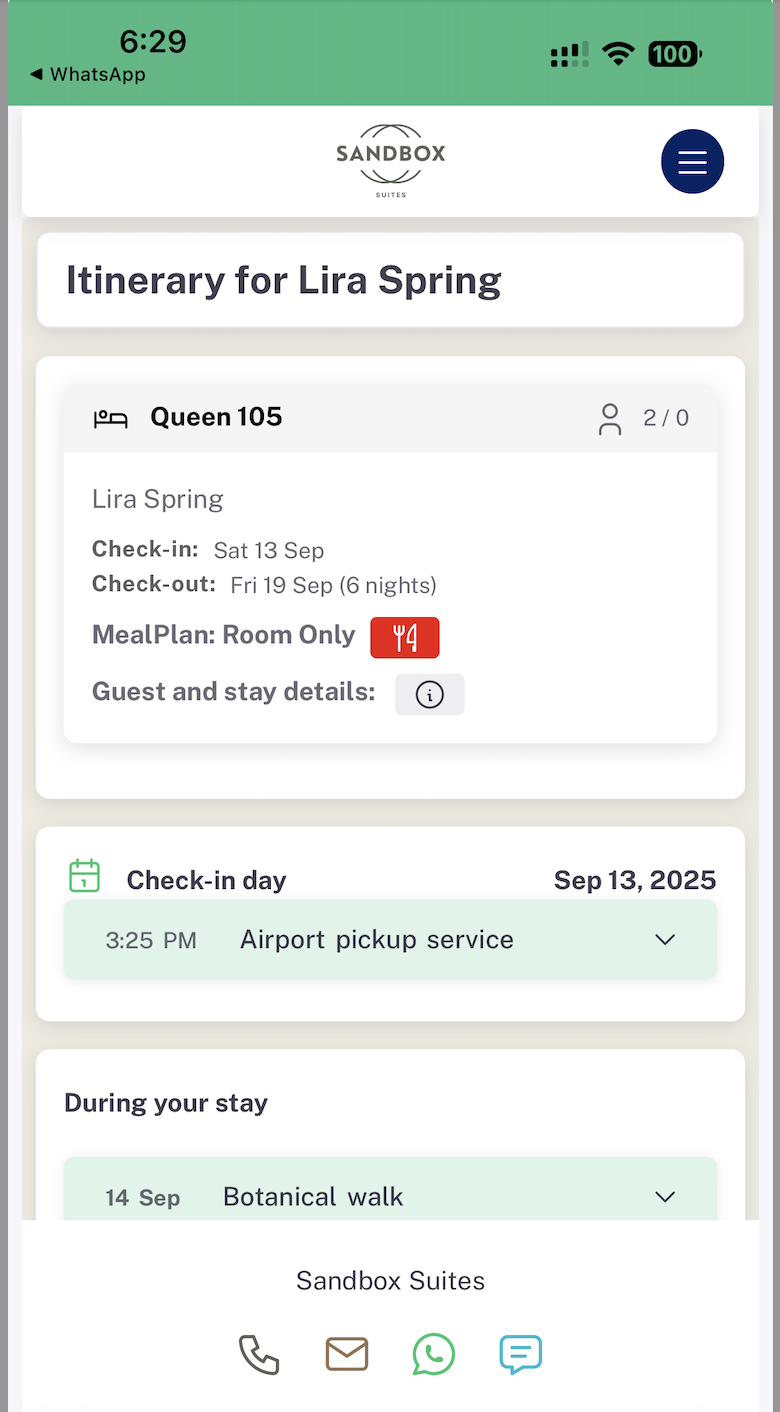
To preview what a guest itinerary looks like, go to the Guests page and select "Copy itinerary link" from the Actions menu. Then paste it into another browser window.
What does the itinerary show?
The guests' itinerary has a few sections.
- Overview of their stay. Including dates of stay, number of adults and children, check-in and check-out dates, and room name/number.
- Guest info. Specifics when names of additional guests and guest allergies are known.
- Meal plan details. Clicking on the meal plan icon next to the meal plan name reveals specific details about the plan.
- Activity summary. At a glance a guest can see the activities and services you're providing.
- Activity details. Clicking on an activity shows all the details that you've provided when making the activity plan.
- Activity booking link. Your guest can quickly click a link to add a transfer or other activities right from their itinerary.
- Hotel information guide. This section offers the guest comprehensive information about your hotel, and allows you to explain your facilities and guest services.
- Contact buttons. Your guest can contact the hotel using these quick actions.
- Links. At the top, a short menu of links include the hotel's website, the hotel's main booking site to "book another stay," a link to your hotel's Online Offers, and a map with directions to the hotel.
Last updated: 10/5/25, 8:14 PM