Planniac Chrome extension for Cloudbeds

The Planniac Chrome extension puts Planniac’s Day View directly inside the Cloudbeds guest calendar, giving reservations and front-desk staff a quick way to see what guests have planned without constantly switching between Cloudbeds and Planniac.
It’s especially useful as a quick reference and booking tool when you’re working with reservations.
Prerequisites:
- Must have a Cloudbeds account and a Planniac account
- Must have Day View enabled in Planniac
What you can do
See a guest’s Planniac activity bookings in Cloudbeds
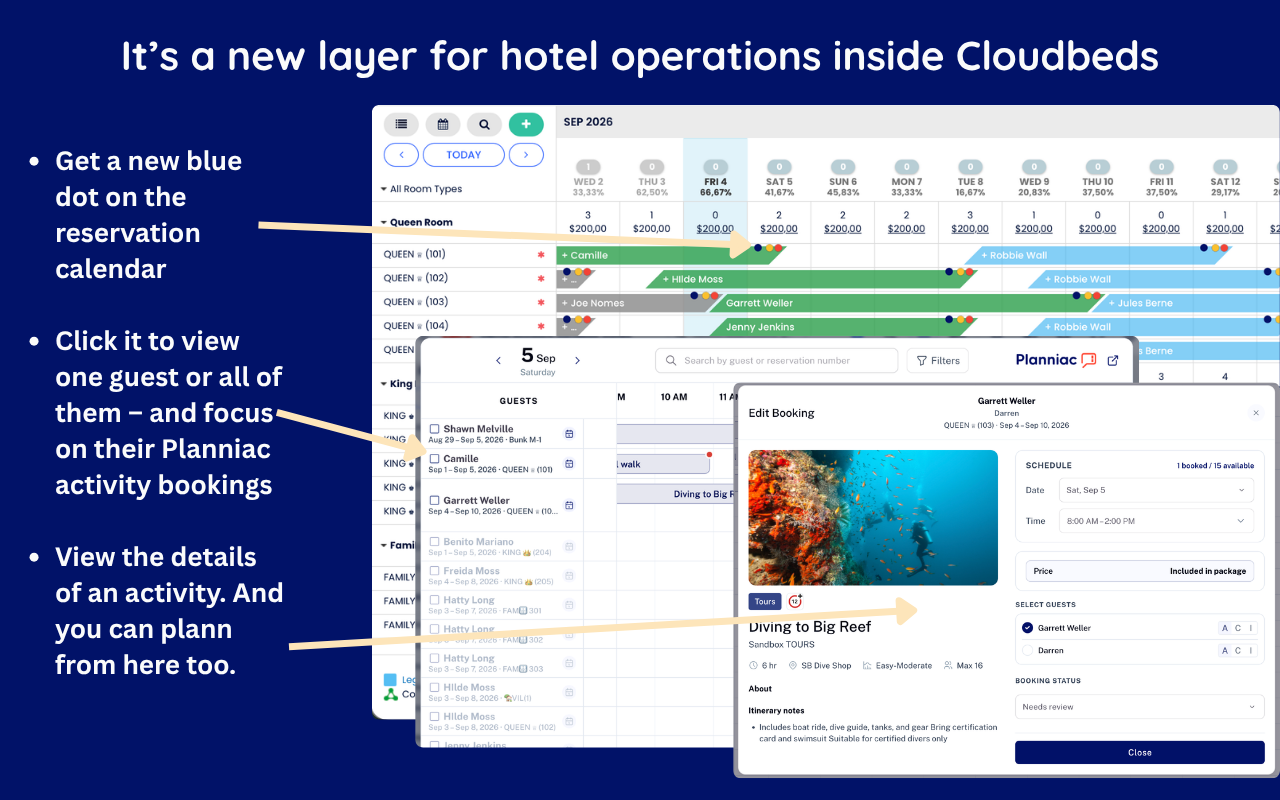
A small blue dot appears on reservations that have Planniac activity bookings.
This gives reservations staff an immediate visual cue that there is more to see about the guest beyond their room reservation.
Click the blue dot to open Planniac Day View
Click the blue dot on a reservation to open the Planniac Day View right within Cloudbeds.
From there, you can:
- View one guest and their activities
- View all guests and their activities
- Focus on the guest’s Planniac activity bookings
- Quickly see what guests have planned during their stay
View activity details and book from there
Click an activity to see its details, including information such as:
- Activity name
- Date and time
- Number of guests
- Price
- Booking status
- Description and itinerary notes
- Other booking details
You can also plan or book activities directly from this view, making it a convenient tool when a guest calls or emails reservations asking about what they can do during their stay.
A handy tool for reservations staff
The extension is designed to keep Planniac close at hand without making reservations staff jump back and forth between systems.
Cloudbeds remains your reservation system. Planniac handles the guest activities and experiences. The extension simply brings the two together where reservations staff are already working.
So when a guest asks:
“What do we have planned during our stay?”
or
“Can we add a snorkeling trip?”
your reservations team can get to the answer — and take action — right from the Cloudbeds calendar.
Install the Planniac Chrome extension
The extension is available from the Chrome Web Store.
Once installed, it provides quick access to Planniac Day View from the Cloudbeds calendar.
Note: The extension is intended for hotels that use both Cloudbeds and Planniac. Planniac’s Cloudbeds integration keeps reservation information synchronized between the two systems.