Ensure all your business details on Planniac are precise and accurate.
Ensure all your business details on Planniac are precise and accurate to maintain a professional image and enhance visibility. Double-check that your business name, contact details, location, and hours are current and consistent. Accuracy helps customers find and trust your brand, building a strong presence on Planniac.
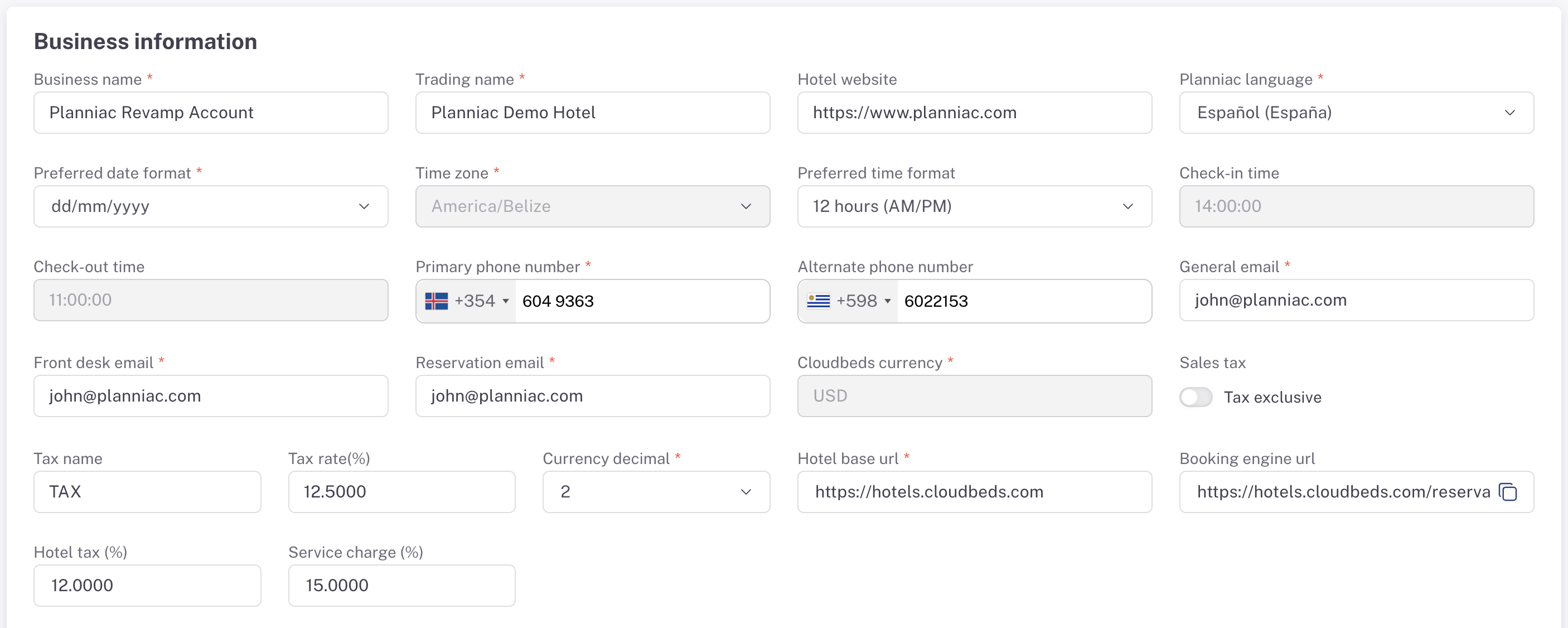 **Business name:** This is the official name of your legal entity.
**Trading name:** Your hotel name, if it's different from your business name.
**Planniac language:** Specify the preferred language for displaying Planniac. (For internal use only)
**Preferred date format:** Set a date format that is comfortable for your users, as it will be used consistently throughout the site.
**Time zone:** The time zone is preset in Cloudbeds PMS and displays the current setting, which cannot be changed by the hotel.
**Primary phone number:** Provide your main property number here; there's a different area to specify front desk, reservations, and numbers for SMS or WhatsApp.
**General email:** Use your hotel's primary email address.
**Front desk email:** If applicable, enter the email address for your front desk or concierge staff. Otherwise, enter the general email address.
**Reservations email:** Some hotels use a separate email address for reservations. Enter that if applicable.
**PMS currency:** Planniac will read the currency from your PMS, and that is the currency you must use for Planniac to ensure proper guest folio billing.
**Currency decimal digits:** Specify the number of digits after the decimal point you wish to display. The most common is 2, such as 3.00. If your currency uses many digits, consider using "0."
**Sales tax:** Match your sales tax settings to your PMS. "Tax inclusive" means the tax is included in your activity prices. In the US and some other countries, tax is added on top of the price (not inclusive). Include the tax and the rate for display purposes.
**Location settings:** Search for your property on the map by typing in the hotel location field. If your business location appears on Google Maps, select it. After placing the pin, fill out the additional address fields.
**Primary guest service contacts:** Fill in the information for the contact methods you will use.
**Legal age settings:** In some countries or states, the age someone is considered an adult is not the same as the age at which they can consume alcohol. Set these ages with the protection of your business, employees, and customers in mind.
**Images:** Upload images used throughout the site here. These appear both online and offline and are part of Planniac's online tools like the guest itinerary, online offers (upsell) page, and guest pre-registration page.
**Business name:** This is the official name of your legal entity.
**Trading name:** Your hotel name, if it's different from your business name.
**Planniac language:** Specify the preferred language for displaying Planniac. (For internal use only)
**Preferred date format:** Set a date format that is comfortable for your users, as it will be used consistently throughout the site.
**Time zone:** The time zone is preset in Cloudbeds PMS and displays the current setting, which cannot be changed by the hotel.
**Primary phone number:** Provide your main property number here; there's a different area to specify front desk, reservations, and numbers for SMS or WhatsApp.
**General email:** Use your hotel's primary email address.
**Front desk email:** If applicable, enter the email address for your front desk or concierge staff. Otherwise, enter the general email address.
**Reservations email:** Some hotels use a separate email address for reservations. Enter that if applicable.
**PMS currency:** Planniac will read the currency from your PMS, and that is the currency you must use for Planniac to ensure proper guest folio billing.
**Currency decimal digits:** Specify the number of digits after the decimal point you wish to display. The most common is 2, such as 3.00. If your currency uses many digits, consider using "0."
**Sales tax:** Match your sales tax settings to your PMS. "Tax inclusive" means the tax is included in your activity prices. In the US and some other countries, tax is added on top of the price (not inclusive). Include the tax and the rate for display purposes.
**Location settings:** Search for your property on the map by typing in the hotel location field. If your business location appears on Google Maps, select it. After placing the pin, fill out the additional address fields.
**Primary guest service contacts:** Fill in the information for the contact methods you will use.
**Legal age settings:** In some countries or states, the age someone is considered an adult is not the same as the age at which they can consume alcohol. Set these ages with the protection of your business, employees, and customers in mind.
**Images:** Upload images used throughout the site here. These appear both online and offline and are part of Planniac's online tools like the guest itinerary, online offers (upsell) page, and guest pre-registration page.
